NovelFun - Webnovel & Fictions
Beet MobilidadeBooks & Reference
2.78.00 Reviews
- Version
- 1.3.11
- Installs
- 10.00K
- Age Rating
- Teen
Screenshots
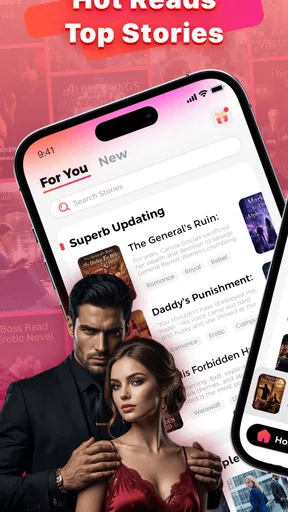
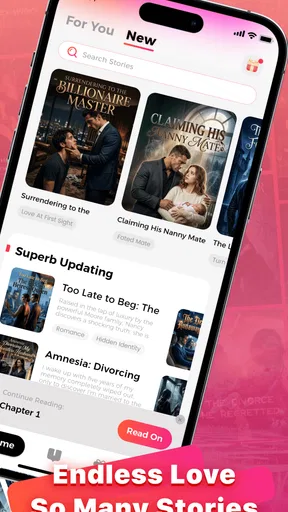
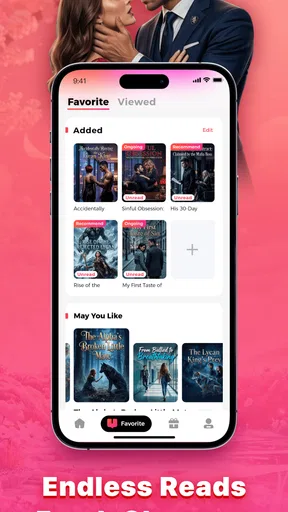
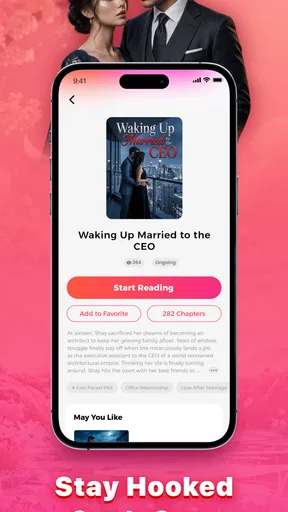
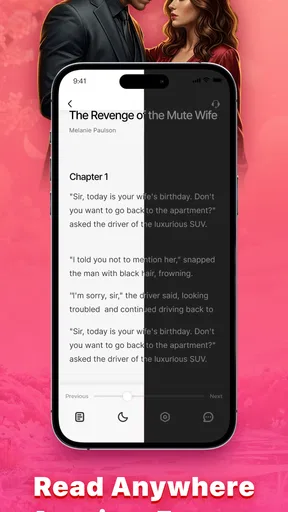
Our Review of NovelFun - Webnovel & Fictions
 Analysis by Appyee
I approached NovelFun - Webnovel & Fictions as a reader looking for something easy to open during a spare moment, rather than as a replacement for a complete digital library. It belongs to the Books & Reference category, comes from Beet Mobilidade, and is free to install. Its basic promise is simple: give fiction readers a place to discover and follow stories from a phone. That makes the first impression inviting, but the real question is whether the reading experience feels comfortable enough to become part of your routine.
My overall view is mixed but useful. NovelFun can appeal to readers who enjoy browsing serialized fiction and do not mind exploring a relatively small service. At the same time, the average rating of 2.7 shows that the experience has not been universally smooth, so I would not install it expecting the polish of the biggest established reading platforms. I would treat it as an additional reading option: worth testing if its available stories match your interests, but not something I would choose blindly for a long-term reading collection.
What to expect before you start reading
The first thing to understand is the type of reading experience this app is trying to provide. NovelFun is centered on webnovel-style and fictional content, which usually suits readers who like discovering stories in a phone-friendly format and returning to them in short sessions. That is different from opening a conventional ebook reader with a book you already own. Here, the appeal is more about finding something new and deciding whether it deserves your attention.
That distinction matters because expectations shape the experience. If you want a carefully organized personal library, broad reference material, or a familiar ebook marketplace, a traditional reading app may be a better fit. If you enjoy sampling fiction, following developing narratives, and using your phone as an always-available reading space, NovelFun makes more sense as a trial.
The app is free, which removes the biggest barrier to trying it. However, in-app purchases range from $0.49 to $99.99 per item. I would therefore approach the catalog with a clear spending limit. Free installation does not automatically mean that every reading path will remain free, and the wide purchase range makes it especially important to understand what an individual story or reading action costs before committing.
NovelFun is marked for Teen users. That is useful context for families and younger readers, but I would still encourage anyone sharing a device or payment method to check the content and purchase flow personally. A Teen label is not a substitute for deciding whether a particular story suits an individual reader’s age, preferences, or comfort level.
The current version is 1.3.11 and the app supports Android 7.0 or later. In practical terms, that gives it a fairly broad potential device range, including phones that are not recent. Still, compatibility alone does not guarantee that every older phone will feel equally comfortable. Reading apps depend heavily on display size, text rendering, and general responsiveness, so a larger screen may make a bigger difference than the Android version itself.
Who is most likely to enjoy it
I see the strongest audience as casual fiction readers who want a new story without first buying a complete book. It can also suit someone who likes alternating between several stories, especially when reading happens in brief windows: on a lunch break, while waiting for an appointment, or before sleeping. The format is more approachable when you think of it as a discovery shelf rather than a definitive home for every book you read.
Readers who need a very mature ecosystem should be more cautious. The app has over ten thousand installs, which suggests that it has reached a real audience, but it is still much smaller than the major names in mobile reading. A smaller audience can mean a more limited sense of momentum around the catalog, and the modest number of ratings makes the public feedback less comprehensive than what you might find for a mainstream alternative.
I would also skip it if your priority is a completely predictable cost structure. The presence of purchases does not make the app unusable, but it does mean that budget-conscious readers should not assume that enjoying one story will follow the same payment pattern as reading a book from a conventional subscription or library service.
Getting from installation to a meaningful first read
I use the first session as a practical test, not a tour of every option: I look for one story that suits my mood, read far enough to judge its opening, and check the next step before continuing. That keeps discovery focused and makes it easier to decide whether NovelFun fits a real reading break.
Start with a low-pressure setup
After installing, my advice is to avoid treating the first session like a commitment. The best initial goal is not to build a huge reading list; it is to find one story that makes you want to continue. Browse calmly, look at the story presentation, and pay attention to whether the available fiction matches the moods and genres you actually read. This simple approach prevents the common mistake of judging the entire app after opening the first item that appears.
Because NovelFun is a Books & Reference app rather than a general social platform, I would keep the setup focused on reading. If the app presents choices about interests or reading preferences, select only options that genuinely describe you. Over-selecting categories can make discovery less useful, while choosing nothing may leave you with a less personal starting point. The practical aim is a manageable first screen, not a perfect profile.
Before beginning a long story, inspect the purchase cues around it. This is one of the most important habits for this particular app because the free entry point and the in-app purchase range create two different questions: can I open this story, and can I continue it without spending more than I planned? Those are not always the same question. I would make that distinction before becoming emotionally invested in a plot.
A second useful habit is to choose a short first session. Give yourself enough time to read the opening and decide whether the writing, pacing, and presentation work for you, but do not immediately treat the first discovery as your next major reading project. This makes it easier to compare several stories and find the one that fits your taste instead of simply following the first available option.
Your first successful action should be deliberately small
For a first-time user, success should mean finding one appealing fiction title and reading enough to form an honest opinion. That sounds obvious, but it is a better test than browsing endlessly. If you can move from the opening screen to a story that holds your attention, NovelFun has already demonstrated its main value for you. If you spend the whole session searching without finding a promising match, that is meaningful feedback too.
I recommend using a simple three-part check while reading. First, ask whether the opening gives you a reason to continue. Second, notice whether the text is comfortable on your phone without constant adjustment. Third, check whether the next reading step is clear and affordable before proceeding. These checks reveal more than the app’s short store description because they focus on the complete path from discovery to continued reading.
For an everyday scenario, imagine that you have fifteen quiet minutes at the end of the day. Instead of opening the app with the vague goal of “finding something good,” decide that you will sample one story and stop after the first natural break. If the story works, you have a clear next session. If it does not, you can return to browsing without feeling that you wasted an hour. This small routine is especially helpful with serialized fiction, where the first chapter may not represent the whole reading experience.
Another practical workflow is to keep a mental shortlist of two or three possibilities rather than opening every title. Compare them by tone, opening quality, and continuation cost. This reduces decision fatigue and helps you notice whether NovelFun is giving you genuine variety or simply repeating the same type of recommendation. It also makes the app easier to evaluate fairly during the first few days.
Confusion points that can affect your decision
The most likely confusion is the difference between a free app and a fully free reading service. NovelFun costs nothing to install, but purchases are available inside the app, from small amounts up to substantially larger individual items. I would never tap a purchase button simply to remove a reading interruption without first checking what that action unlocks and whether it applies once or repeatedly. A few seconds of caution can prevent an unpleasant surprise.
Another possible source of confusion is judging the service by the number of stories visible during one browse. A small or unfamiliar catalog can feel disappointing if you expect the depth of a major ebook platform. I would instead ask a narrower question: does it have enough fiction in the styles I personally enjoy? The answer can be yes for one reader and no for another, even when both use the same version.
The Teen content rating also deserves a practical interpretation. It gives a general age classification, but it does not tell you whether every story will suit your personal standards. If you are choosing the app for a younger family member, I would review titles together at the beginning and make sure purchases cannot be made casually through a shared device. That is sensible reading hygiene, not a criticism of the app alone.
Device compatibility can create another misunderstanding. Android 7.0 support means that the software is intended to run on devices using that operating system or newer, but an older phone may still provide a less pleasant reading session because of its screen, battery condition, or overall performance. If text feels cramped or navigation feels slow, test the display settings and compare the same session on another compatible phone before deciding that the catalog itself is the problem.
Finally, the public rating should be read as a warning to test rather than as an automatic rejection. The app has around twenty ratings and fewer than ten written reviews, so the visible feedback is limited. That does not prove that every user will encounter problems, but it does tell me not to make a large purchase or build my entire reading routine around NovelFun before I have personally checked the parts that matter most.
How it compares with familiar alternatives
Compared with a standard ebook reader, NovelFun is more appealing when discovery matters more than ownership. A conventional reader is usually the better choice when you already have books, require dependable library management, or want a consistent reading environment across a large collection. NovelFun is more interesting when you want to browse fiction and decide what to read from inside the app rather than importing a book you selected elsewhere.
Compared with a library borrowing app, it may be more convenient for immediate experimentation, but a library service can offer clearer value for readers who already have access to a strong digital collection. Borrowing systems also tend to fit people who plan reading around known titles. NovelFun fits the opposite mood: opening the app without a fixed book in mind and seeing whether a serialized story catches your attention.
Compared with large webnovel platforms, the main trade-off is scale and familiarity. Bigger services often make it easier to find extensive community activity, established reading histories, and a broad range of genres. NovelFun’s smaller footprint may still be enough if its selection suits you, but I would not choose it solely because it is free to install. The deciding factor should be whether the actual stories and payment flow feel worthwhile after a short test.
That comparison also explains why I would not recommend replacing every other reading tool with this one. NovelFun can occupy a specific space in your routine: lightweight fiction discovery on mobile. It does not need to win every category to be useful, but you should know which job you are asking it to perform.
Making the next reading session work better
Once you find a story you like, slow down before purchasing anything. Read the available continuation information carefully, note the point at which payment may appear, and decide whether the story has earned that commitment. This is a more reliable strategy than paying early because the opening was promising. Serialized fiction can change pace, and your interest may depend on how the next section develops.
I would also keep NovelFun as part of a rotation rather than making it the only app on your phone. Use it for discovery sessions, then switch to your preferred ebook reader or library app when you want a book you already trust. This approach reduces pressure on NovelFun and lets you judge it for what it does best instead of comparing every small detail with services built around different reading models.
If you are reading on an older Android phone, try a short session at the time of day when you normally read. A device that seems fine for a quick browse may feel tiring after sustained text reading. Check whether the font, spacing, and navigation remain comfortable, and decide based on your actual routine rather than the installation screen. The most useful test is always the one that resembles your real life.
For families, I would make the first session supervised and explain the purchase boundary clearly. For an individual reader, I would set a personal budget before exploring the catalog. For a casual reader, I would judge the app by how quickly it helps you reach one enjoyable story. These are different starting points, and each produces a more honest assessment than simply asking whether the app looks attractive.
Beet Mobilidade has released NovelFun as a free fiction-reading option, and version 1.3.11 gives first-time users a clear opportunity to see whether the concept fits their habits. My recommendation is cautious: try it if you enjoy webnovel-style discovery and want another source of mobile fiction, but keep your first session small and your spending deliberate. The smartest way to use NovelFun is to test the reading path before investing in it.
In the end, I see it as a niche option rather than a universal reading solution. It may be a pleasant find for someone who discovers the right story quickly, while readers seeking a deep catalog, established library tools, or completely predictable pricing may be happier elsewhere. If the first meaningful read feels smooth, the app has earned a place in your rotation. If browsing, continuation costs, or presentation create friction, there is little reason to force it when more established alternatives may better match your needs.
Verdict
Strengths of NovelFun - Webnovel & Fictions
- Large library of webnovels and serialized fiction
- Frequent updates keep ongoing stories moving
- Easy chapter reading on mobile devices
- Personalized recommendations help discover new books
- Supports saving favorite stories for quick access
Limitations of NovelFun - Webnovel & Fictions
- Some titles may contain inconsistent editing or translation
- Many stories are unfinished and require waiting for updates
- Premium chapters can make completing books expensive
- Content quality varies considerably between authors
- Requires an internet connection for most reading features
Similar Picks in This Category
View All
Google Play Books & Audiobooks
Google LLC4.7

네이버 - NAVER
NAVER Corp.3.5

Wattpad - Read & Write Stories
Wattpad.com3.7

King James Bible - Verse+Audio
Ozion4.8

Bible Offline-KJV Holy Bible
Bíblia Offline4.9

Amazon Kindle: Reading App
Amazon Mobile LLC4.8
Frequently Asked Questions
What is NovelFun - Webnovel & Fictions?
NovelFun - Webnovel & Fictions is a reading app focused on serialized web novels and fiction stories. It typically brings together romance, fantasy, drama, mystery, and other popular genres in a mobile-friendly format. Readers can browse titles, open chapters, follow ongoing stories, and discover new authors through recommendations, rankings, or categorized libraries.
Is NovelFun free to download and use?
NovelFun can generally be downloaded without paying an upfront installation fee, but that does not necessarily mean every chapter is free. Some stories may provide introductory chapters at no cost and then require coins, credits, subscriptions, or other in-app purchases to continue. Before reading extensively, check the app’s pricing, reward system, and purchase terms in your region.
Does NovelFun offer offline reading?
Offline availability may depend on the specific version of NovelFun, the story, and the reading features enabled for your account. If download options are provided, chapters usually need to be saved while connected to the internet before they can be read offline. Users should also confirm whether downloaded content expires, uses device storage, or remains accessible after logging out.
What genres and stories can readers find on NovelFun?
The app is designed for readers who enjoy digital fiction, especially ongoing web novels and chapter-based stories. Its catalog may include romance, billionaire fiction, fantasy, supernatural adventures, historical settings, suspense, and dramatic relationship plots. Availability can change over time, so the selection you see may differ according to your language, location, and current publishing agreements.
Are there advertisements or in-app purchases in NovelFun?
NovelFun may use a combination of advertising, virtual currency, rewarded activities, and optional purchases to support access to its stories. Depending on the title, readers might unlock chapters with coins or receive limited rewards by completing in-app actions. Review the payment screen carefully before confirming anything, and use parental controls if children may access the device or account.
